
Tiny Tools Project
10 workflow tools. 10 days. Built with AI, by a non-developer.
👋 Hi, I’m Robin Williams - a digital consultant, Gen Xer, and father of three who decided to do something about AI’s growing dominance into the digital sectors I work within. I call it my ‘Tiny Workflow Efficiency Tools project’. Enjoy!
What is the Tiny Tools Project?
I’ve shared openly about how being a Gen Xer and seeing the rise of AI has got me worried for how digital careers. As a father of three, It’s hard to imagine what their future careers paths will look like with the evolution of digital, AI and technology.
I realise that I can respond to the impact of AI in one of three ways:
Do nothing, and wait and see what happens
Try to avoid AI’s impact and move into non-impacted sectors of work
Take a proactive action, and set about experimenting how I can make AI work for me (instead of against me).
Spoiler: I chose number 3! As I don’t want to wait around, and I don’t think AI is avoidable across nearly every sector of business from this point.
In March (2026), this decision led me to undertake a ‘10-in-10 challenge’ to sharpen my skills with AI and how I use it in business.
The challenge was straighforward:
I have to build one tiny workflow efficiency tool per day, for ten days in a row.
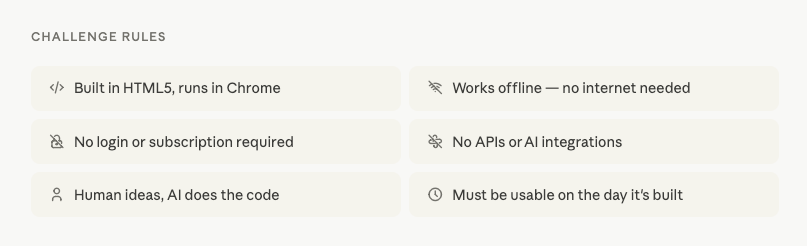
Some challenge rules:
Start, build and use one tiny workflow efficiency tool per day
Human first, AI second (I do the idea and prompting, AI does all the code for me).
I can only use Claude’s free tier to build with (no paid options)
Starting now (no time to pre-plan, prep, or overthink myself into not starting)
My definition of what a Tiny Tool is:
It’s built using HTML5 code (this is for ease with free AI token use, and for time)
Uses chrome browser software to run on laptop of desktop
It needs to be able to work offline and overcome any poor wifi connection
No API’s or AI integrations allowed (no systems linking)
No log-in required to use it
No subscription required to access it
I have to be able to use it on the same day I start building it
Why am I building in public:
This forces me to be accountable
The challenge rules stop me over scoping the tools
My experience and insights could be helpful to others in my situation
People’s feedback and comments help me improve the functionality of the tools (and decide on future updates).
My Tiny Tools Portfolio
The first 10 Tools
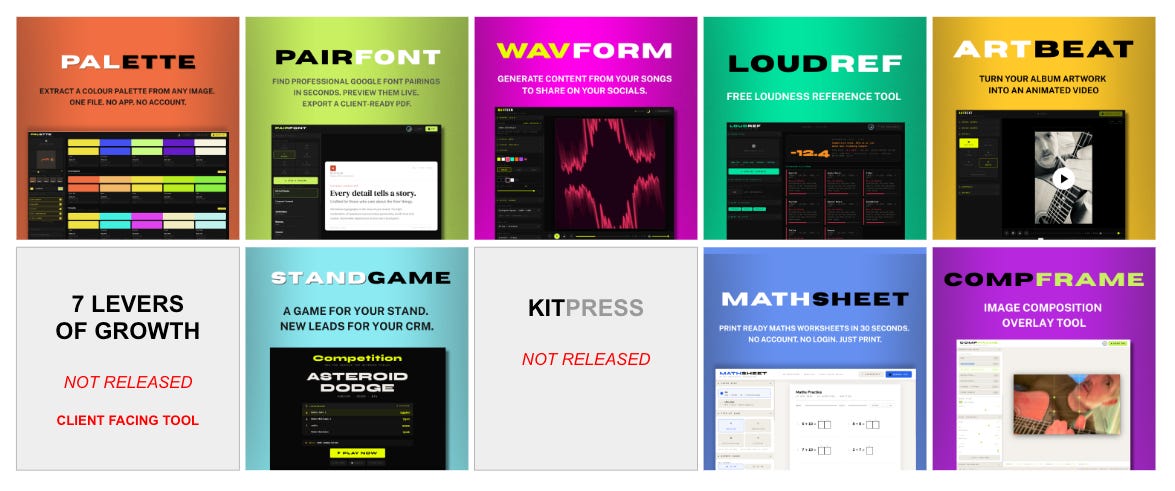
Here are the first 10 tools that I built across 10-days (using AI-assisted coding). Each is designed to solve one real-world workflow problem. There’s details and links for each to help show their use and how they were built during this challenge.
Day 1 - PALETTE Colour Palette Extractor for Designers
“Extract colour palettes from any image for use in design workflows.”
💰 £4 (one-time purchase)
📋 User guide included
🔗 Get Palette or read the Build diary
Status: Live
Day 2 - PAIRFONT Google Font Pairing Tool for Designers
“Find font combinations that work - fast, without the guesswork.”
💰 £6 (one-time purchase)
📋 User guide included
🔗 Get PairFont or read the Build diary
Status: Live
Day 3 - WAVFORM Audio Visualiser Studio for Musicians
“Generate animated visuals from your audio tracks to share on socials.”
💰 £6 (one-time purchase)
📋 User guide included
🔗 Get Wavform or read the Build diary
Status: Live
Day 4 - LOUDREF Free Loudness Reference Tool for Music Producers
“Find out if your master will be turned down, boosted, or played as-is before you upload it anywhere.”
💰 Free
📋 User guide included
🔗 Get LoudRef or read the Build diary
Status: Free
Day 5 - ARTBEAT Album Art Animation Tool for Musicians
“Make your static cover art images move to it’s own music”
💰 £6 (one-time purchase)
📋 User guide included
🔗 Get ArtBeat or read the Build diary
Status: Live
Day 6 - ‘7 LEVERS OF GROWTH’ Business Growth Assessment Tool
“Quickly see which of your digital business growth levers need your attention”
💰 Not for public sale
You can cead the Build diary to find out why
Status: This is a private 1-2-1 consultancy tool for my digital clients
Day 7 - STANDGAME
“A leaderboard game for your event stand - collects leads while people play.”
💰 £6 (one-time purchase)
🔗 Get StandGame or read the Build diary
Status: Live
Day 8 - KITPRESS Music Artist One-Sheet Builder
💰 Not for sale
🔗 Read the Build diary to find out why
Status: Offline
Day 9 - MATHSHEET Free Maths Worksheet Generator for Teachers
“Generate printable maths worksheets instantly - built for primary school teachers.”
💰 Free
📋 User guide included
🔗 Get MathSheet or read the Build Diary
(* you can support this product and upvote it on Product Hunt)
Status: Live
Day 10 - COMPFRAME Image Composition Overlay Tool
“Place your images with more intention. Export at the size you need. No subscription, no upload, no account.”
💰 £6 (one-time purchase)
🔗 Get CompFrame or read the Build diary
Status: Live
How I build these Tiny Tools with AI
Here’s my work flow that I used in order to build these tools during this 10-day challenge. My process changed around day 5, due to me constantly hitting the free tier limits with the AI tool I chose ( which was Claude.ai).
I’ve posted here about three ways you can work with AI if you’re building products with it like I do. But to summarise it again here, I can choose to use AI in a Conversational, Structured or Agentic manner. (The post link above explains the differences).
Days 1-4: Conversational use of AI to build
Here’s the AI workflow summary I started with:
I share some ideas → AI suggests options → I give design and product brief → AI codes the product → I review and feedback → AI updates the code → Final product built
I like this way of working with AI. And have used conversational for the past couple of years. Firstly with CHAT, then moving to Claude in December 2025.
I like opening a new chat/conversation thread, and chatting away like I would to a friend. Sharing ideas, and getting responses. Sense checking, then asking deeper questions to get to a build idea point. Which feels like a native way of working with digital and creative processes.
This worked well for the first few tools, and their iterations. But as you guessed, I soon hit the free tier limits with Claude - working this way. The longer the conversation grew the more it used up tokens (the free thinking function) each time I prompted or responded. It soon became unworkable!
By the start of Day 5, I had no choice but to upgrade my AI workflow to a Structured AI process. (Read the details of this switch over here .)
Day 5-10: Using a structured AI build process
The change in process also altered my workflow. But it did make it easier to build without hitting the free tier limit as quickly. Here’s how I set it up. This structured workflow consisted of two parts.
Part 1: The ‘Project Folder’ setup workflow:
AI reviews the long conversational thread and products so far → AI summarises this into a ‘build document’ → I set up project instructions in the project folder → I add the ‘build document’ to the project as a resource file → I add a HTML product file into the resources.
With this first part setup done, the workflow going forward is simpler. I only had to do this first part once. And it was worth the investment of time to do so (2-3 hours).
Part 2: My new workflow summary:
I suggest tool idea → AI reviews against the instructions & project resources → I confirm build → AI codes the tool → I review and feedback → AI updates the code → Final product built.
This might look similar to the conversational workflow, but there’s a difference. This way - when I prompt - AI consults a set of defined resources and instructions, and a code base example ready to use. I don’t have to prompt with too much detail. It nows how to build the tools I’m designing, and has examples of it’s own code that we’ve completed in another tool.
It doesn’t need to build or review any conversational threads I’ve had before that idea start in part two.
This makes the process simpler. And once the project was set up - this works with less limitations on the free tier, as it doesn’t eat up as many tokens covering old context or conversations. It makes my prompting simpler, and it can follow the instructions like a process that’s defined in a business operations guide (sometimes called SOP’s or standard operating procedures.
Working with AI in a structured project folder meant I could complete the tool per day challenge. Even with a free version of AI.
TIP: This folder/project structure can be duplicated into another version of itself if you set up another account but use a different email. That’s what I did. Then, if I hit the limit, I can pull any files or build over into the next account, and that project. And it’ll continue with the same prompt as before. All I did to set this up was to duplicate the project folder and it’s contents - so they work the same. It’s very cost effective doing this. And you can do this endlessly if you’re strapped for cash or just like to get things for free.
Can anyone build with AI if they are not technical?
Yes, you can work with an AI tool like ChatGPT, or Claude like I did. I’ve also built this folder structure into Perplexity.
The good things about working with AI is that if you get stuck, you can just ask the AI directly to give you instructions on how you should ask it to code for you.
I gave it details about what I was trying to achieve and it suggested a range of options, based on my skills and understanding.
I’ve worked in roles where I’ve briefed and managed developers. So I do know enough about code to understand how it should be structured and built for products like this. And I understand many people won’t have had this experience. But go have a play with your own AI. And see what limitations you hit, then ask it how to get round them.
This is why my rules stated I wasn’t to do any of the coding. This meant my hands were tied when it came to editing or tweaking any of the code, but this forced me to better instruct the tools I wanted, and describe their functions in more depth.
You don’t have to be as strict or use the limitations I did!
Any tool starts with you having the idea of what you want to build. AI can build anything - it seems - though it lacks the reasoning or inspiration to go build what I created on it’s own. That's where I think humans are going to be most important with AI’s integration into businesses and home lives.
I set my challenge rules quite strict to using HMLT files, as I know these can work using chrome browsers. Why? Because Chrome as a program already has a bunch of useful technology within it - that works even if it’s not connected to wifi. Like video rendering, PDF file handling, image output.
My tools just took advantage of what’s already installed on people’s computers, without needing the tools to be huge in code, or to do the ‘heavy lifting’ programing to make it function. This keeps my file size light.
Working with HTML, and getting AI to do the code in that language was far quicker than I could have worked to build these myself. Or with a developer.
I’m not that advanced in coding. However, I do understand how product users need to experience a tool. And what kind of outcome a creator, musician or marketer needs to achieve. So I was scratching my own itch - so to speak - when coming up with ideas.
You can do the same as a way of starting a project like this.
That was my focus for this challenge. I briefed and detailed what I wanted the tools to do - so that the AI could understand my goals. Even without the knowledge I’ve built up, the process is the same for anyone looking to design and build a tool using AI.
I asked Claude how to move to structured workflows. And checked a few other articles and video how-to’s online. The best thing I did was to get Claude to analyse and review our conversational threads, then create it’s own distilled ‘build document’ based on the progress we’d made up to end of Day 4. I could use this Mark Down format (which is less memory usage for the AI than word docs of PDFs) to add into the project resources files.
Now, If you’re a develop, you might be thinking “are all developers doomed?”
I don’t think so. Here’s why ….
AI still needs human experiences to shape the output for other humans
AI was useful as the developer partner for me in this coding challenge. But no tool it built for me was ready to be released (or used) by people at the first attempt.
They all needed me to do reviews, testing and provide feedback with updates and issues. This took many more iterations before we got to a stage I was able to fully use them. Each of my build diaries details the challenges I had for each tool AI built with me.
My challenge required me to be able to solve the workflow issue with the tool I was building on the same day. Time mattered.
All of the tools that were built needed at least 3-4 rounds of updates and changes to make them fully operational. Even if the design and small details could still be improved later on.
If I had to sum up my experience of having AI code to my ideas, I’d say:
“Working with AI is becoming more straightforward, but still has it's frustrations, and limitations. I feel the output is only as good as the quality of the instructions you give it. Be prepared to make more than a few revisions to get the actual output level you want from AI when you build with it.”
Yes, AI delivers a good standard of code at this lower code base level.
HTML is simple when compared with other code bases like PHP or React, but AI still gets things wrong in it’s coding, and there were many instances where I could see issues with the tools and their functionality.
I found that adding feedback details in logical order AND dropping in screenshots of what I was referencing - were useful enough for AI to then properly assess and give me solutions to the issues we were having.
I was very impressed by how it could handle the text and visual information in this manner. That’s something I could use in future projects - where I draw or visualise my tool interface, and see if AI can build from an image.
The overlooked risk of building with AI
My tools list shows the types of workflows these tools can help with efficiency.
I purposely didn’t build any tools that required personal details of business data to access.
I know that Vibe coding is a big trend at the moment.
However, building with technologies that use API’s and require AI to run online can be prone to hacking and the exposure of personal data you own or collect from others.
So be warned! Unless you know how to ask and brief for security development - then expect AI to do a standard job.
However, that’s not going to be secure enough in most larger development projects.
So it might be that you need a proper coding expert/developer or security expert - to then confirm you’re safe before you go live with a project, app or website. If you’re building something and charging for it’s use (or selling tools) - then security issues need to be managed. Otherwise they can be costly if things go wrong or become compromised.
My challenge purposely focused on building tools that didn’t require connection to the internet.
Meaning, there’s no real issue anyone will have with security or data storage for anyone who buys and uses them. Everything is cached locally to the device using it. And nothing leaves the computer once the tool is downloaded. Unless the user shares their work they made with it.
That was intentional from the start.
And done in part as my way of avoiding losing time in dealing with security issues during the build process.
It was also done as a way to force my own creativity in ideas for what tools and functionality would help make workflows more effective for the end-user.
I like how singular these tools are in their design and focus. They fix on key issue, and that’s it.
I’ve tried to stop scope creep from slowing the building process - and my time limit on the challenge helped prevent that from happening.
Combined, I believe these tiny tools offer a ‘time-saving toolkit’ that could be bundled together for greater workflow impact.
They are safe to use. So I know if my own kids wanted to use them - there’s no issues with what they’re working on.
I’ll keep detailing and sharing my design and build diaries for future tools. Make sure to subscribe for free below - to receive them.
Follow the ongoing Tiny Tools project here
Whenever I have a new Tiny Tool update I’ll update this substack, so be sure to save it to hear about future tools. In the meantime, you can connect with me on LinkedIn. And find out more about how I do digital on my website: www.robindoesdigital.com