
MATHSHEET - Build Diary, Tool 9
I've set my sights on a small educational resource making tool.

Nine days in. Eight tools built. And this day’s tool build process was a good one for personal skills and learning to code with AI.
Most of the tools I’ve made this week have been aimed at marketers, musicians, social media managers. The reason being these are people I know - just like me, with problems I recognise from my own day-to-day workflow.
MATHSHEET came out of a different idea. It’s a focus on building an educational tool - which feels more personal to me than the some of the others.
Here’s why!
Making workflow tools to help your own kids
I’ve got three (lovely, and lively) kids. Two of them are in comprehensive now, 12 to 16. The oldest is now at Uni.
And I’ve spent enough evenings watching them wrestle with school homework to know that the gap between “they need practice” and “here’s something useful to practice with” could be shorter. Especially when it comes to Maths practice.
Not because the resources don’t exist (they do). In fact, there’s millions of maths related resources online when you go searching. And that’s part of the problem for parents and educators.
But because getting to these resources is a faff. Many online places require logins. Some need paid subscriptions. There’s cookies to accept, and lots of ad banners - especially on the free resources. I often think it requires lots more GDPR-questionable permissions for just wanting to download a sheet of sums - than it should require.
I also know a few home educators and their networks. And, I kept thinking about how much time gets eaten up by the admin of teaching (searching and planning for things to do, rather than the actual teaching or imparting of knowledge).
So I wanted to put my attention into building something useful to improve an educators workflow. Which more than fits my 10-in-10 challenge rules.
What competing developers taught me about code base options
The spark for the technical approach for this tool came from something I half-remembered from my old Ed-tech leadership days.
I was involved in running developer teams, delivering complex digital ed-tech platforms and apps - and keeping projects moving through design, UX and delivery.
A remember a couple of devs once discussing which things certain codebases did better than others. And which code base could do the most, with the least amount of vode.
HTML5 came up on one side, as did Vue.js. Both devs were adamant that their code approach was the best and most ‘lightweight’. But the point that stuck out to me was about how little code you needed to be able to create useful tools. When compared to building with other deeper code bases like REACT.
I obviously filed this info away somewhere at the back of my mind as it suddenly came back to me into starting this challenge. About keeping offline and lightweight with code.
So when I started thinking about what a genuinely useful output looks like - I checked with Claude to ask it’s opinion on what it could functionally code with - for educational tools. Was my choice of HTML5 decent enough or not?
Turn’s out this was a good choice. So I moved ahead to deciding what to build.
Keeping it simple
Now it’s fine to make a tool. That’s what this challenge is all about.
But, I wondered … could I make a tool that makes resources when you use it? Instead of it doing the task of a workflow. It’s output can be used elsewhere - like a print out and shared to others.
Not the same output each time, if you get my meaning.
I’ve proved this can be done with the previous tools. My tool that output video files show how different effects and music combinations can be rendered. But these are what I’d consider to be fixed output. They output a final resource that’s added into another tool - like socials.
Could I make a tool that offers PDF output (something that prints nicely) - but could it be made to be tailored each time it outputs - so that it’s useful to kids with different skills.
I chose Math as a topic. As this is something all kids (even my own) are required to practice. I know that ‘math sheets’ are heavily searched keywords from my ed-tech days.
Now, maths is a big topic, but can I limit the functionality to help reduce scope creep?
I think by keeping to numbers and sums under 100. Then there’s not too much complexity. And I can then building on the use of + - / * selections to add more depth of sum type.
Functionality for the user
My options on the left hand side of this tool are where this tool can shine. It can be configured to offer way more output questions. Or keep things simpler for younger children.
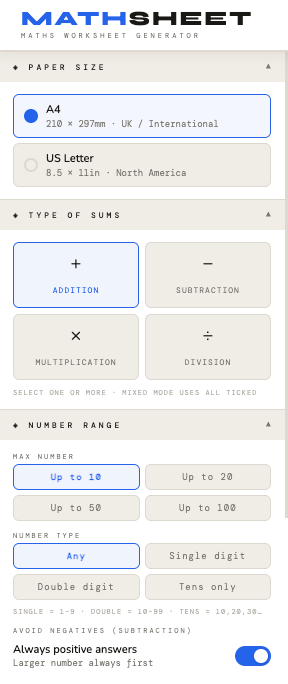
I’ve got Paper sizes first - so this pretty much covers the world in these two options.
Then I’ve got the Type of sums. You can pick on, a couple, or all.
The number range offers some pre-sets, for ease-of-use. And then you can play around with the number type.
There’s an option that one of the teacher’s fed back on - having the option for an always positive larger number - as this helps some children with their working out.
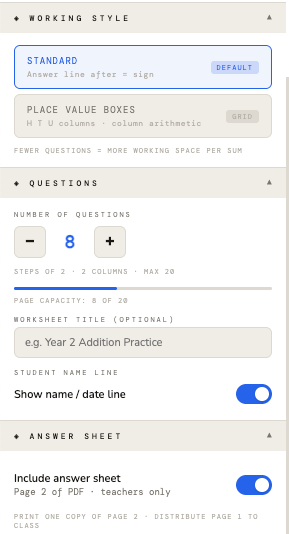
Below these first sets up options are a few more.
Choose from Standard or Number place for the answers. This was a request from one of the teachers. And I think this adds way more use - like they’d explained for different key stages.
Amount of questions on the page. This needed to be placed lower that the option before as I’ve had to put some logic into the sheet. The space needed for rendering place number boxes takes up more room than the standard equals line most sums have. But from a UX point of view - putting this option below, means the user doesn’t see the roll back logic when they select the amount of questions.
Basically, if you choose number boxes, you’re restricted to how many questions you can put on the sheet.
Finally, an option for putting the answers on page two of the PDF this tool generates.
You can choose to do this or not. As the teacher might just want to generate a bunch of random questions - and make older kids work out if they are right.
Like all my other tools. You don’t need a web app requiring hosting and updates. Mathsheet is just a file you right click and open in chrome. One that outputs other PDF files. You download it once. And you can use it forever. There’s no internet needed after the first load.
I’ve got this build part nailed down from the previous 8 days of builds.
Mathsheet sounds simple as a concept. But it’s actually offering something bigger to education in general - that I’ve been thinking about (but I’ll get to that in a bit).
Building Mathsheet
The first version was quick to build. Claude seemed to get this prompt and design requirements down quickly. But I’ve done some of the prep work to this by moving into a project structured workflow with this AI. So there’s a defined build and development doc in markdown format to help it review and build each time.
This first version looked clean enough. some toggles and sliders to set questions and number values.
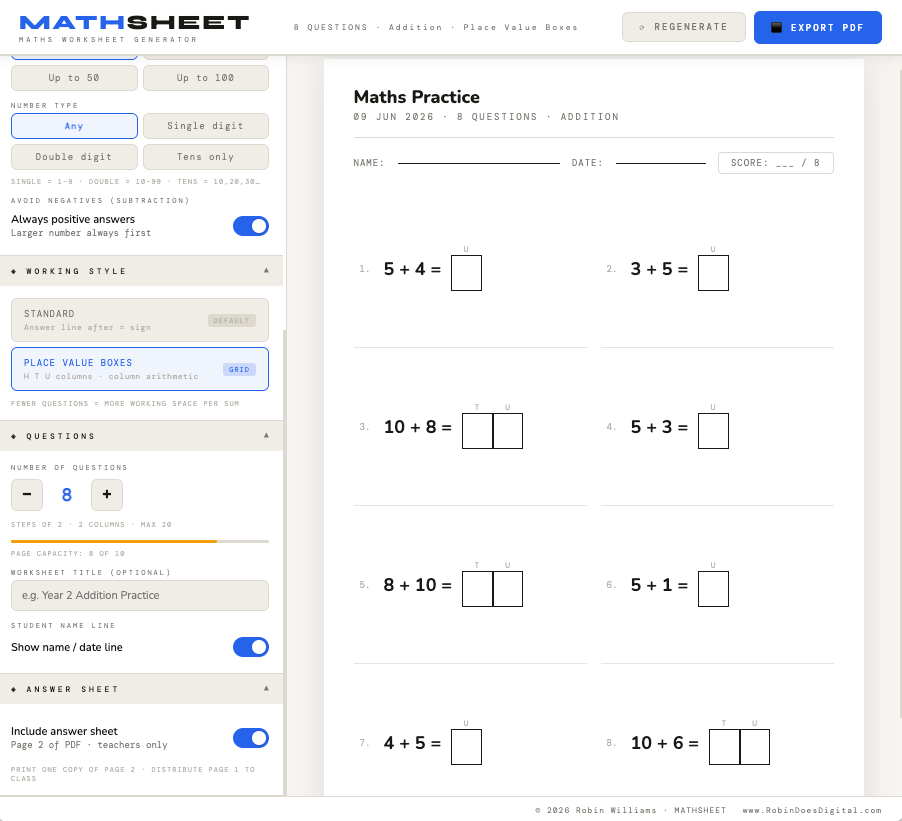
I sent it to a couple of teacher contacts to get a feel for it. As soon as I’d realised I was working in Maths tools, I’d reached out to them - and they responded before I’d finished the first build.
Their feedback was honest. My first tool version was probably too simple for proper classroom use. Not enough control over difficulty. No place value boxes for the way younger kids are taught to work through sums. Fair points, in my opinion and an easy fix to re-brief Claude for an update.
So I went back in. Asked for more functionality. And this is where it gets interesting, because scope creep in a tool like this is genuinely easy to fall into.
There’s so much maths that could go into something like this. Fractions. Decimals. Negative numbers. Word problems. You could spend months building it out.
I didn’t. But it was tempting to do more. So, I made a call to stop at a point that I felt was was genuinely useful - and met most of their suggestions - without it becoming a project I couldn’t ship before the day was ended.
That said, getting the question count to work dynamically with the newly suggested place value box layout took more iteration than I expected.
The issues I kept hitting was if you set a high question count and then switched to number boxes as the equals answer (using a simple toggle), the layout breaks unless there’s logic controlling it.
Getting that logic working cleanly took me to eight or nine builds in total. There were rollback moments when things went too off track. I also noticed that the dark mode toggle was undoing other logic when you changes to light view mode.
There was a live preview panel update required as that wasn’t updating consistently in reali-time when you made changes on the left hand options. These kind of snagging things doesn’t sound dramatic but it can eats hours.
One thing I’ll carry forward for the next build:
When a tool has lots of settings and modes, you have to test almost every combination before it’s ready. That’s a lesson I’ve learnt by having to go test all variations. I’ll need to remember that when defining the options in the next tools I build.
More real-world utility than previous tools
What I didn’t expect was the moment the feedback shifted from “this is useful” to “this is actually more interesting than I thought.”
The teacher who tested it used the phrase “better than a printable worksheet” because it could be changed quickly and refreshed with random new questions once settings were in place.
That seems obvious now, but wasn’t something I’d intentionally put into the design . But it’s the difference between a static resource and something that moves with a teacher’s needs. Different class, different level, different day. You can just generate, print, go. Or save the PDFs as files in folders by age range - if you want to be more organised.
But then I started thinking about where else this type of resource making tool could go!
I keep coming back to offline tools. Not just for convenience. But as a means of access. I know there are classrooms in low-bandwidth areas. As well as schools in countries with rolling power cuts. In places where a Chromebook with a downloaded file is the most reliable bit of technology available. India. Parts of Africa. Rural schools anywhere to be honest.
A tool that runs offline, on old hardware, with no account and no data sent anywhere, is a different kind of useful in those contexts.
I’m still thinking about how to get it there. Whether that’s partnerships, whether it’s translation into visual-only UX so the language barrier goes away. I don’t have answers yet. But I’m thinking about it. That UX approach might make it more universal - as it’s not language bound. But it will take some designing and more time that I have right now.
Fun fact: I also sent a slightly mad pitch email to Yorkshire Tea about a “T is for Teaching” campaign tie-in.
They were kind enough to send back a nice reply - and a week later I got a big box of tea delivered for free - rather than ignore me entirely. So that’s something.
There might be a more serious version of that idea somewhere, with a brand or charity that’s actually trying to do something in education. I’ll write more about that approach separately. It’s something I think tools like this can help start conversations around. As they are easy to share and simple to demo. Plus - Easy to colour to a brand colour, and add logo’s or trackable linke to.
NOTE: All my builds now use the instruction in Claude so that the bottom right of the tool screen has a simple link (with UTM for marketing tracking) that’s generated for me. It’s a great instruction to add in. And once in - doesn’t require much checking.
I’m making this tool free to download
MATHSHEET is going to be listed for free. Permanently. No trial, no upsell inside the tool.
That was a decision I made early on, and I don’t think I’ll change.
Gatekeeping something as useful as this for education doesn’t feel right with me. The value I’m extracting from this challenge is in the learning, the build process, and what comes next. Not in charging a fiver for a worksheet generator - that I already know will be useful to many, many people.
Educational support is something I care a lot about. And so this feels like it fits my ethos around where this tool could help people out. Using AI for good maybe?
What comes next?
I’m still shaping ideas for other educational tools. There’s probably a small educational toolkit I could built that adds to what Mathsheet can do (no pun intended). But these other tools might need to cover other areas of education.
And there’s something that appeals to me about seeing if there’s educators would be interested in learning this build approach.
After all, teaching them how to build their own tools means they could iterate and make their own bespoke tools - as they’d know how to best fit them to their class and working style.
I like the idea that you can build genuinely useful offline tools for your classroom without needing to be a developer. Not that I’m against developers. But I realise not everyone has the relationships or works with developers like I do.
It’s good that educational tools like this can be used without needing an internet connection. Connection to wifi is a big issue for many teachers. So is having to use old tech.
MATHSHEET is live on Gumroad now, free to download. It’s native to use, but I put in a user guide to help explain the functions just in case people needed it.
If you know a teacher, a home educator, or a parent who’d find it useful, please do send them the link. That’s genuinely all I’d ask. And if you do use it yourself - drop me an email or comment here to let me know how you found the experience.
More tomorrow.
-R
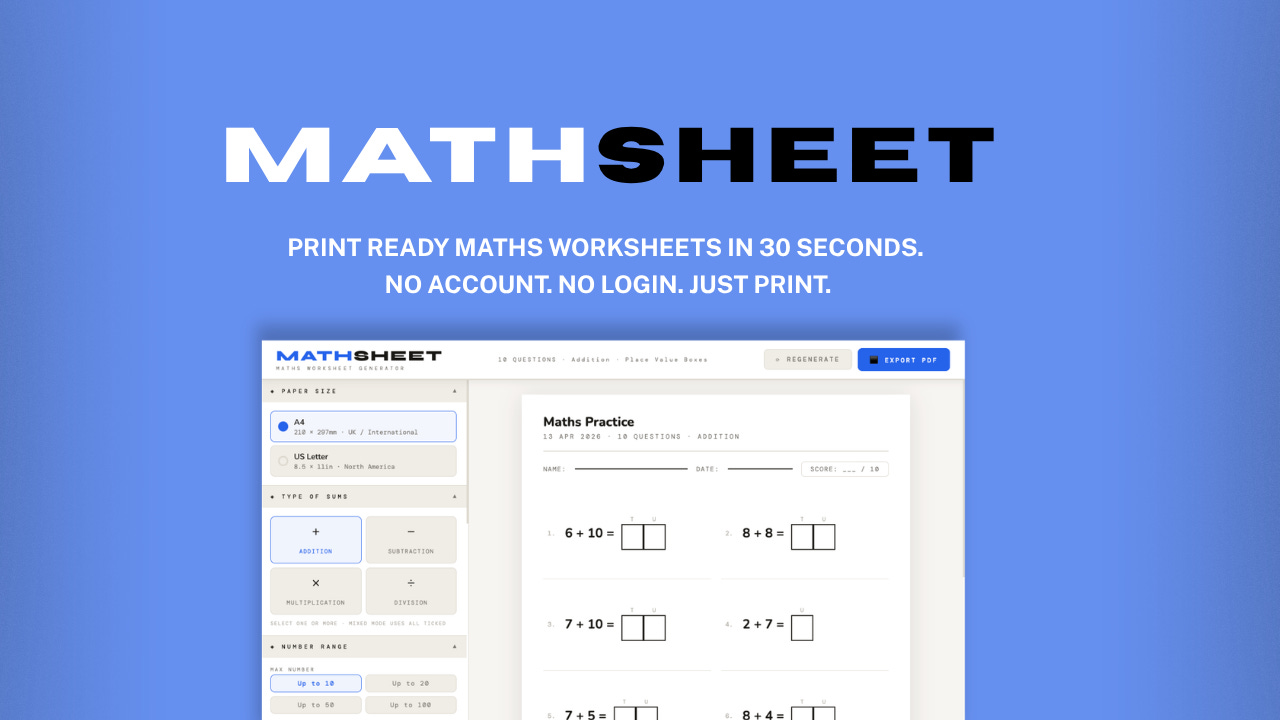
Wondering what all this 10-by-10 product building is about?
Jump to the first post in this series - where I talk about why AI’s got me worried (as a GenX creative). :-)