
The Magic of Animating Audio
Up to now I've been playing it safe. Day three's product requires a little more magic.

Okay, the last two products I’ve used AI to code for me - have been kinda ‘safe’. Meaning they relied mostly on a tool output to PDF (and PNG).
These are my brand colour family creator tool, PALETTE, and my Google Font pairing designer tool called PAIRFONT.
It’s day 3!
And I reckon I can ‘up the ante’ and task Claude’s free version to try something more challenging to build me, as a tool.
I know HTML5 offers canvas animations inbuilt into the browser (like the old flash video technology). So, I want to test out what this can do in a product that has some utility for creators like me.
Defining the problem for product number three
Outside of my digital business focus, I also produce songs and music. Have done this since I was 16 (writing songs) and more recently spent time the past few years learning to record and produce.
I have a mix of indie folk songs, and instrumentals on guitar and piano that I’ve built into a catalog.
The big challenge for song writers like me isn’t the act of writing and singing. It’s the the challenge of having to use social media content to build awareness of the music you’re releasing.
And this industry trend is relentless. For GenX’ers like me it can be very daunting. I’m lucky, I’ve worked in social media and agencies for a long time now. I know how to create content - however even I get dry days - where making content is a thankless chore and a drain on the fun, creative process I prefer to do - making music.
My goal with product number 3 is simple.
Solve a pain point for creating easy-to-generate content that I can use to promote my music with.
If it works for me, it’ll help others too. I know a lot of musicians how face the social media content treadmill of always feeding the beast!
Planning the product’s output
back in the late 90’s I was a VJ. That’s short for video jockey. Someone who mixes video loops and footage live to big name DJ’s - onto large stage screens at front of the big nightclubs.
In my day, I did this at places like GATECRASHER (deep house music). Now, being an indie kid - and a musician helped. I could match beats and timings well.
But generating content that was fresh and new was a challenge. Remember - these events started at 10pm and ran till 5AM the next day. 7-hours of footage each weekend was the demand. Or a mix of styles that could be applied throughout the event.
We didn’t have amazing tech. And we had to use video tapes. Running visuals across three tape players - through a broadcast mixing desk.
My go-to cheat for creating interesting visuals?
Waveform animations!
This is where graphics are generated to the audio beats and frequencies of songs. If you had a PS1 console - there was a built in feature that played waveforms. This is what we plugged into the mixing desk.
Waveforms were an option then, maybe they will be now for a way to make content generation easier?
I briefed Claude and see what it says to my concept. I’d outlined a conversation approach to this brief. Using the new conversation option. We covered some of the options HTML5 offered, and then we narrowed these down into a set scope of build.
What options I want to include in my product
6 Visual Modes (this keeps options simple, but easy to follow)
Bars = classic frequency bars, hollow or filled
Wave = smooth oscilloscope waveform
Radial = circular frequency spikes
Particles = bass-reactive particle bursts from centre
Lines = connected frequency line art
Mirror = four-quadrant symmetry
Visual Controls
Sensitivity, Line Width, Bar Count, Smoothing
Depth/Glow (the bloom effect intensity)
Opacity, Rotation Speed
Mirror toggle (horizontal/vertical) and Fill mode
Colour System
6 preset swatches + custom colour picker
3 colour modes: Solid / Gradient / Reactive (hue shifts with frequency intensity)
Custom background colour + fade/trail amount
Social Media Presets (offering pre-sets is a better UX experience)
YouTube 1080p, 4K, Shorts
Instagram Square, Story, Landscape
TikTok, Twitter/X, Facebook Feed & Story
Export
Exports as WebM video (Chrome’s native format - Claude tells me this is compatible with YouTube and most editors)
24/30/60fps options
3 quality tiers up to 16 Mbps
Naming my product for search and user intent
I’ve done this a couple of time now. I’ll ask Claude to go look at what’s on the market for similar products. And pull a list of search intent words it thinks users looking for this product or solution might be using. It then ranks options and gives me some considerations.
Video software is a big industry. Theres’ loads of platforms people can use. And tones of free Waveform makers I can use. Cap-cut is built into many social media tools.
But free tools require me to upload my content to a third party website. Where there’s terms and conditions that could make my content derivatives accessible to other’s.
Many are also subscription based, and don’t work off-line - as they require API’s plugins. My product challenge rules - were set up to add some degree of limitation - and restriction to API’s - so that I need to be more creative in my solutions and prompt engineering.
There were a few names to look into - but I decided on the simplest and most relevant one.
WAVFORM.
This matches my naming strategy of ‘the name says what it does’. So PALETTE, and PAIRFONT - already set this as my standard. Plus, I kinda like how these all sound ‘connected’ as each one is built. Like I’m building a porfolio - which I suppose I am.
Claude’s search results were:
The specific spelling “WAVFORM” (one E, no E) appears to be clear. Nothing in the results uses that exact spelling. What does exist is:
Waveform (with the E) = that’s Tracktion’s DAW software, a full digital audio workstation for recording and editing audio and MIDI
Wav2Bar = an open source visualiser tool, different name
WaveVisual, EchoWave, Wavve are all other tools in the space
Your single-word WAVFORM (dropping the E, like a deliberate stylisation) reads as distinct and looks intentional like a brand decision rather than a typo. It’s also visually clean and short, which works well for a logo. It occupies a different enough space from “Waveform” (the DAW) that confusion is unlikely, especially since your tool is a visualiser, not a DAW.
I did a bit of manual checking to make sure. And it looks like what Claude was saying is true. So I instructed the build to go ahead.
Tweaking and iterations of the build
First version was okay - which surprised me. But, when I played around for a while I needed some tweaking. It took around 5 iterations to get this into a good shape to fully test.
The tool works natively.
I drag a song file in (or find it in the search).
Then I choose the visual options. And mess about with the speed and other things that affect the visual creation.
I added the option for audio and visual, or just visual only. This can alter the render settings - making some of the visuals might be just the need, but I can add audio over in another editing software. So this felt like a good option.
The switching of the formats works nicely. And once I get a song loaded up - I could, in theory, just change the formats - and repeat the output render option. Making 4-5 formats from the same song and setup. This is something I hadn’t considered when building - but it’s a faster way than using something like Canva - where I’m fixed with the format I start the project or file in. It’s not possible to switch formats - unless I duplicate and reformat each time.
Challenges in this iteration were on the rendering. It was a bit hit and miss when I tested it. This took time and as I re-ran each build I started hitting the limits on the free tier usage. So there were some 3-4 hour wait times for the next upgrade.
Token use = the way AI measures it’s free and paid tiers (through text and information you’ve already got in the conversation, and the new text you add) can build up quickly. I was just hitting this on the previous product build. This product seemed to take more - as it was working with Audio and Video - so more complex in the build and code set up. I’ll need to find a way past this limitation. I’ll share more on these ideas in a post or two’s time.
How the WAVFORM animations look
It’s simple to use. Drag or locate an audio file. WAV format works well - which is what most artists need for uploading to their streaming anyhow.
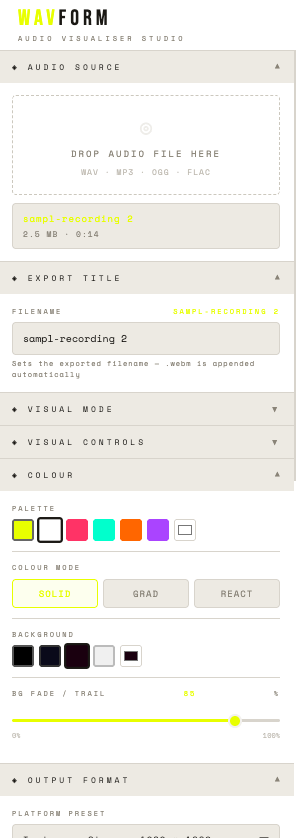
There’s some options and toggles down the side bar of the left hand side of the screen. These allo you select the type of wave form (there’s 6). Then you can tweak colours, rotation, background colour and sensitivity.
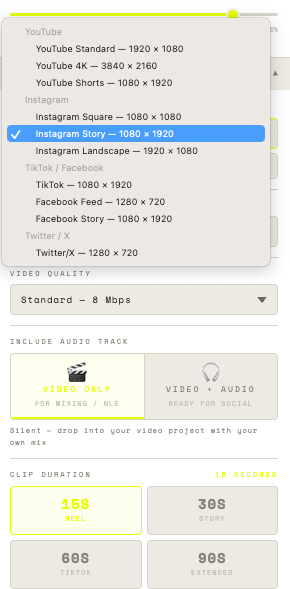
These toggles and selectors offer a massive range of personalisation - with few lines of code. So working with audio or visual files - and these types of effects is something HTML5 files are good with. And this keeps the file size small. And that’s great for offline tools.
Saving waveform animations for social media
I’ve put in some options for pre-set recording timings. 10, 30, 60 and 90-secs. And then full track option. You can stop the recording at any point - if you want more time control.
The file is rendered to WEBM format, for ease of output.
I still need to play around with getting this into my photo’s in my iPhone. But I can also use these video files in most video editor software tools. Giving me options in how I add text or other effects.
There’s pre-sets for types of formats too. Like YouTube, Instagram, TikTok. The main places I think content will be used.
Once you’ve got a setup - you can easily switch between formats with one click. And simply run the output to video again. Offering a batch processing way to work with the tool.
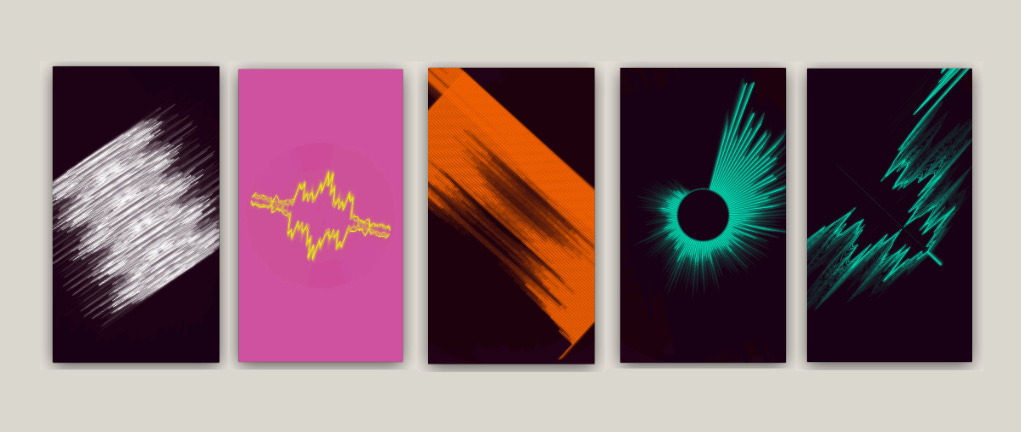
These outputs offer square, and the 9:16 ratios most social channels require. YouTube has some different ones, but like LinkedIn and other places - you can typcially use variants of these without too much issue.
Packaging WAVFORM into a proper product
So after around 8 iterations in total (at the time of writing this) I think the product’s ready to release.
I need to create a User Guide - which I’ll do using Claude to create a DOCX format file that I can edit in Google Docs. This means if I update areas or specific functions, I can update that too.
I’ll package the PDF user guide and the HTML5 file into Gumroad - as a product. This means I can add a price and some landing page copy to help people understand it’s value.
Price wise, I want to keep this low enough to make sense to someone who needs to make lots of audio/visual content - so thinking around £6. This will be under $10 - as Gumroad will handle US currency.
The option for audio and visual tools using this approach is bigger than I thought. I’ve got some more ideas to explore - which might offer a few tools that could bundle together and offer more value - as an up-sell offer. Like £15 for four tools, instead of £6 per tool.
That’s something that could offer a value up-sell that could allow me to consider running paid ads. Why? Because if I can create a higher checkout value, then the cost of getting paid ads clicks (pence to pounds) then I can model out an ROI (Return of Investment) ratio on the cost of getting a purchase, versus profit margin.
First though, I need to get some friends to test and then see if I can generate some reviews. These will help to see if there’s any further improvements before it gets promotion out wider.
Today’s build raised two key challenges for my 10-in-10 development challenge.
I need to explore ways to get tools to create MP4’s out of the video files. This is mostly for my own benefit. But I know there’s a lot more complexity to solving this than HTML5 allows right now. I’ll need to dig into this more.
Hitting the free tier limits when working with Claude. Today was more painful than I expected it to be. I had to keep making updates and then waiting for 3-4 hours till my limit reset. This means pushing into the evening, very late. To make the deadline. I’ll need to review my working process with AI. Otherwise this challenge will be a real struggle.
For now, It’s very late, and I need to get some sleep, and focus on to tomorrow’s product.